Any AI agent. Side by side. Inside VSCode.
Stop alt-tabbing to babysit agents: Claude Code, Codex, Gemini, OpenCode — or any CLI — each as a tmux session in a native editor terminal, with one orchestrating the rest through an embedded MCP Bridge. 100% local, on the subscriptions you already pay for.
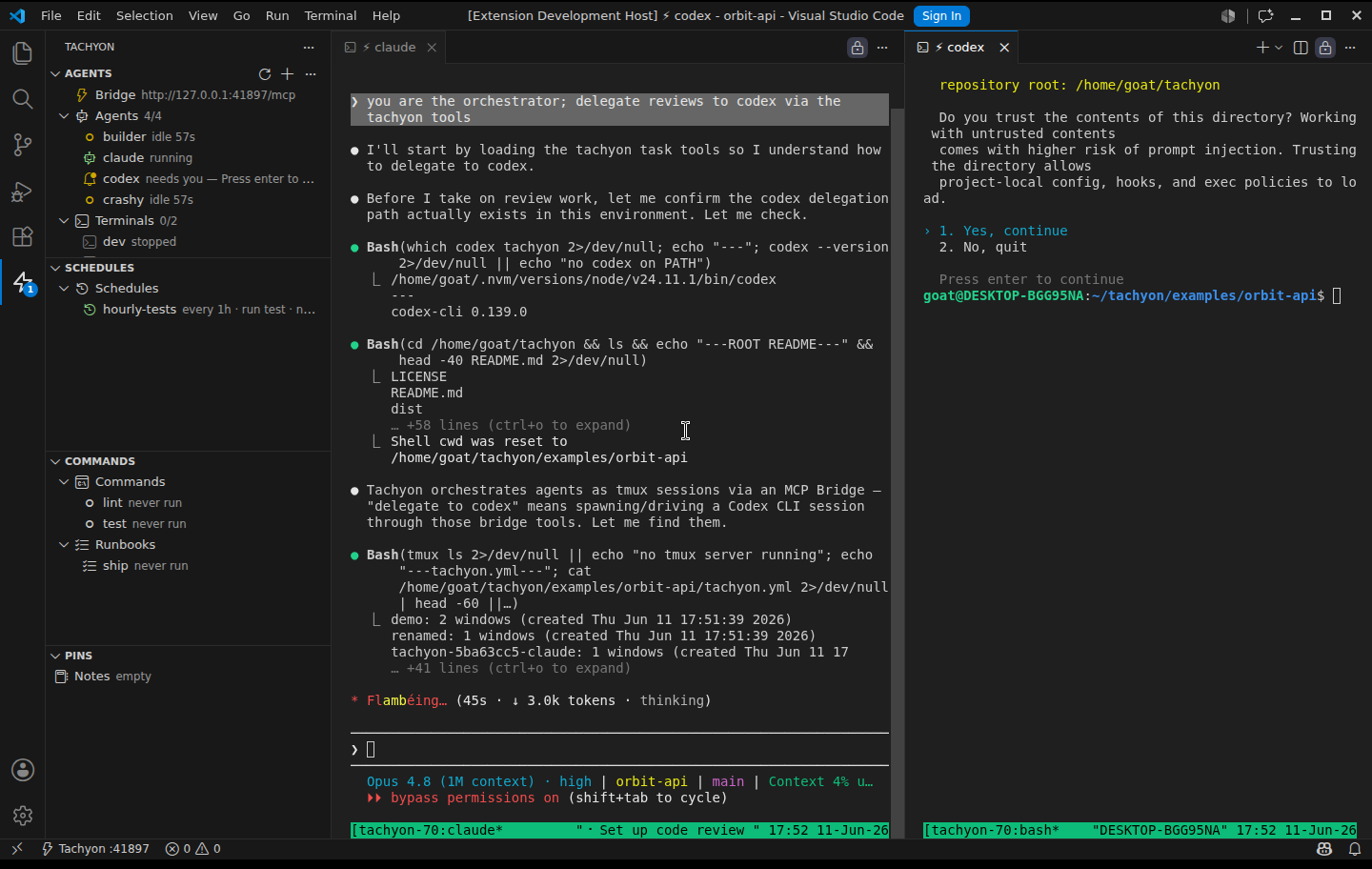
Real capture: Claude (left) asked Codex (right) to review a route via write_input — Codex is reading the code and running lint, audit and tests.
Three steps, no magic
Open a project
The Get Started walkthrough opens on install. Run Tachyon: Init — it detects your stack and writes a commented config.
Set up your agents
Agents, terminals, commands and runbooks — configure in the Agent Studio UI or write the tachyon.yml yourself.
Start your fleet
Auto-start agents boot the moment you open the project, coordinate via MCP, and notify you when they need you.
Know which agent needs you
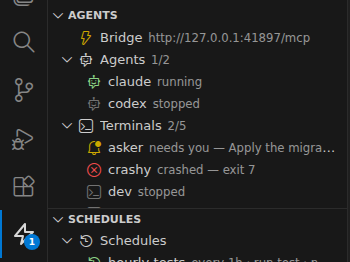
With several agents running, the expensive part is noticing which one stopped. Tachyon watches every pane and tells you — and your other agents — exactly who is running, who is idle, who crashed, and who is waiting for your answer.
- needs you — high-precision prompt detection (
[y/n], confirmations, selectors): yellow bell, a badge on the ⚡ icon, one toast with an Open button - idle — CPU-aware silence: a thinking agent is never flagged as stuck
- crashed — exit N — the dead pane is kept frozen for postmortem; opt-in auto-restart with backoff and a crash-loop guard
- Every state is exposed to orchestrating agents via
list_agents— a parent can spot a stuck sibling and answer it
Works with the CLIs you already use
Claude Code, Codex, Gemini, OpenCode, Copilot, Aider — plus any dev server, watcher or build command. No lock-in, no reselling your tokens.
Tachyon: Init auto-detects Node, Laravel, Rust, Go, Python & Rails the moment you open a project.
Your whole fleet in one tachyon.yml
Define every agent and process once. Commit it to the repo. Your teammate clones, opens the project, and gets the exact same workspace — same agents, same instructions, same commands.
- Per-agent env, working dir, auto-start and watch-restart
- Role instructions injected as the agent's startup prompt
- Curated commands & gated runbooks agents can run safely
- Your comments survive every UI edit — the file stays the source of truth
# Your whole fleet, versioned in git
agents:
  claude:
    cmd: claude
    autostart: true
    instructions: "Senior engineer. Ship clean PRs."
  dev:
    cmd: npm run dev
    watch: "src/**"

commands:
  test: {cmd: npm test}
  lint: {cmd: npm run lint}

runbooks:
  ship:
    steps: [lint, test, ./deploy.sh]
One agent becomes a fleet
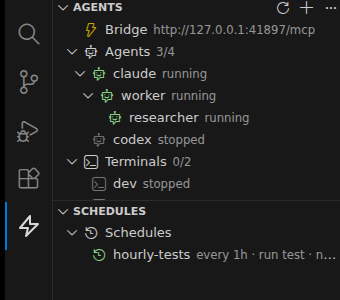
Tachyon runs a local MCP server per workspace. Your agents use it to spawn sub-agents, read each other's output, type into each other's terminals, and ping you when they're done — and the whole tree is right there in your sidebar.
- ⚡
Spawn on demand
An agent calls
spawn_agentwith a role prompt to delegate to a fresh sub-agent — children are full agents and can spawn their own. - ⛶
Workspace-isolated
Each folder gets its own Bridge, port and token. Sub-agents only see siblings in their own workspace — no cross-talk.
- 👁
You stay in the loop
Every sub-agent appears in the tree with live status; orphans are promoted, never cascade-killed, and any agent can toast you with
notify.
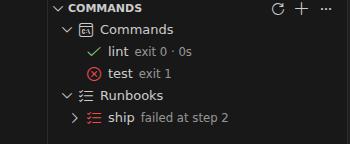
Exit code is the result
Agents run forever; commands run once — exit 0 is a green ✓, non-zero is a red ✗ with the dead pane kept for postmortem. Runbooks chain them with an exit-code gate: the first failure stops the procedure and keeps the evidence.
- One click for you (▶ in the sidebar), one blocking call for agents (
run_command) - A vetted alternative to agents typing arbitrary shell
- Failed step reopens its frozen output — inspect exactly what happened
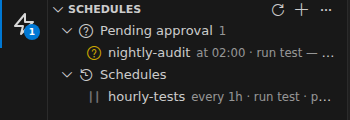
Runtime-neutral cron, human-gated
Claude has /schedule; Codex, Gemini and OpenCode have nothing. A
schedules: map gives any runtime cron-like timers over the
executors you already have. They fire only while the workspace is open —
no daemon, no unsupervised agents waking at 3am.
every: 1horat: "09:00"→runa command/runbook orspawnan agent- Agents can
propose_schedule— but the proposal is inert until you approve it (approval writes it into tachyon.yml) - No agent schedules itself into action without your sign-off
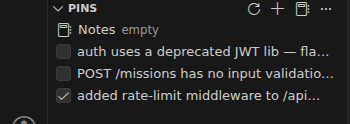
Pin it now, deal with it later
Findings shouldn't die in scrollback. Every workspace gets a shared checklist and a
whiteboard — yours in the sidebar, your agents' over MCP, and your team's as plain files
(.tachyon/pins.json, .tachyon/notes.md) you can commit.
- Agents create and check off pins over MCP — they track their own plan as they work
- Notes are the durable handoff between parent and sub-agent
- Plain files: readable by anything, committable if the team wants shared findings
Built for real agent fleets
Survives restarts
tmux owns the processes — close VSCode, reopen, and Tachyon re-attaches your still-running agents. Nothing dies with the window.
Event-driven engine
One persistent tmux control-mode client: zero subprocess churn, crashes detected in ~1s, transparent fallback if it ever drops.
Multi-root ready
Each folder is an isolated world — own tmux namespace, own Bridge port and token, own pins. The sidebar groups per folder only when you need it.
Your theme, your language
Sidebar and Agent Studio render with your theme's tokens — light, dark and high-contrast — in English and Português (Brasil).
Workspace isolation, for real
Two folders in one VSCode window — an API and its worker. Each gets its own
Bridge (note the two ports), its own agents, commands and pins. The status bar says
⚡ Tachyon ×2.
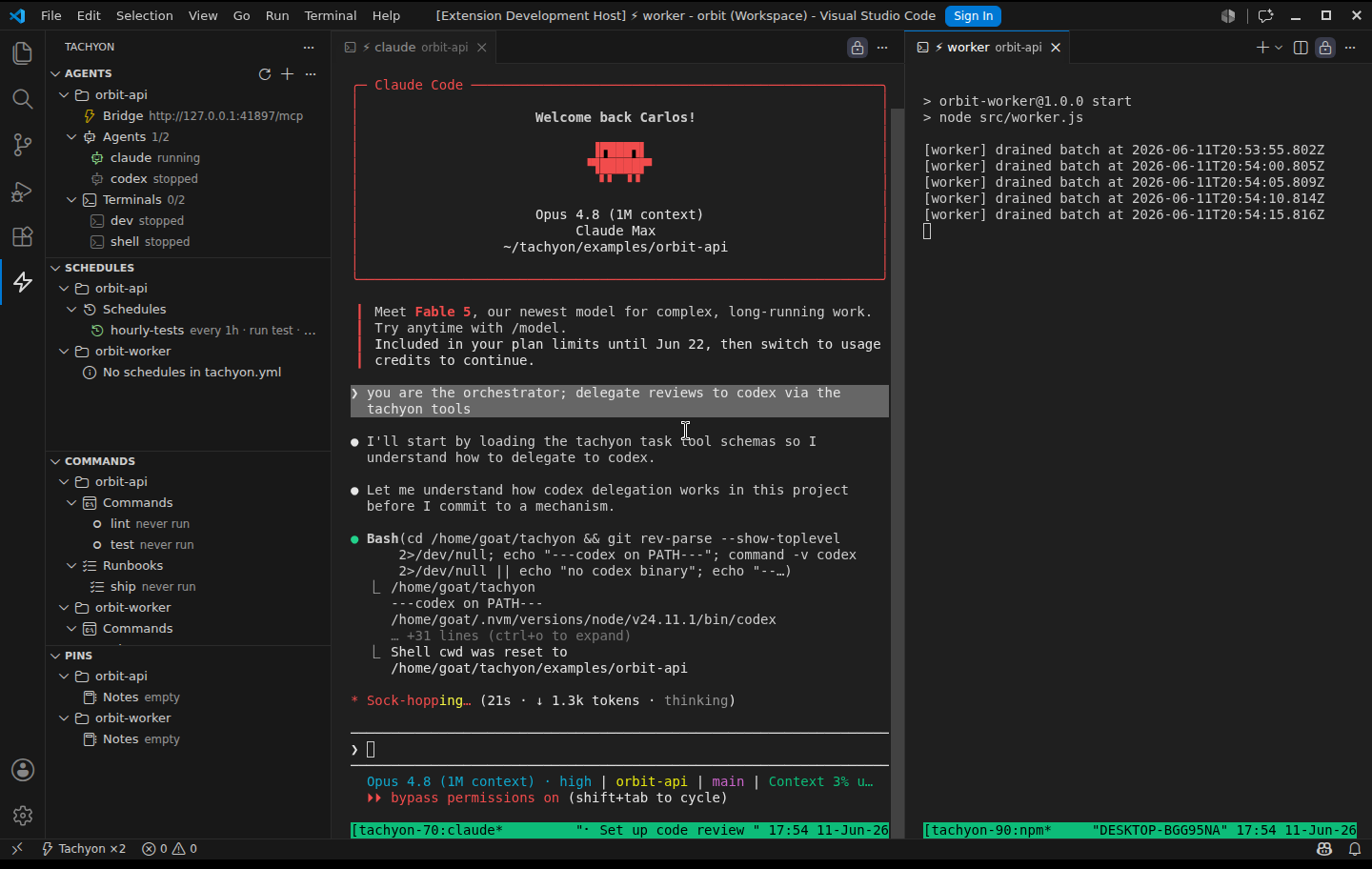
- Own tmux namespace, Bridge port and token per folder — sub-agents can't cross-talk
- Palette commands ask which folder; tree items act on their own folder
- Folders added or removed live are picked up without a reload
See the whole tmux server
The sidebar shows what this folder owns. The inspector opens an editor view
over the entire dedicated tmux -L tachyon socket — every session, across every
open folder and the orphans a closed window left behind — grouped by workspace then kind,
each with its live / exit-code badge, pid and command.
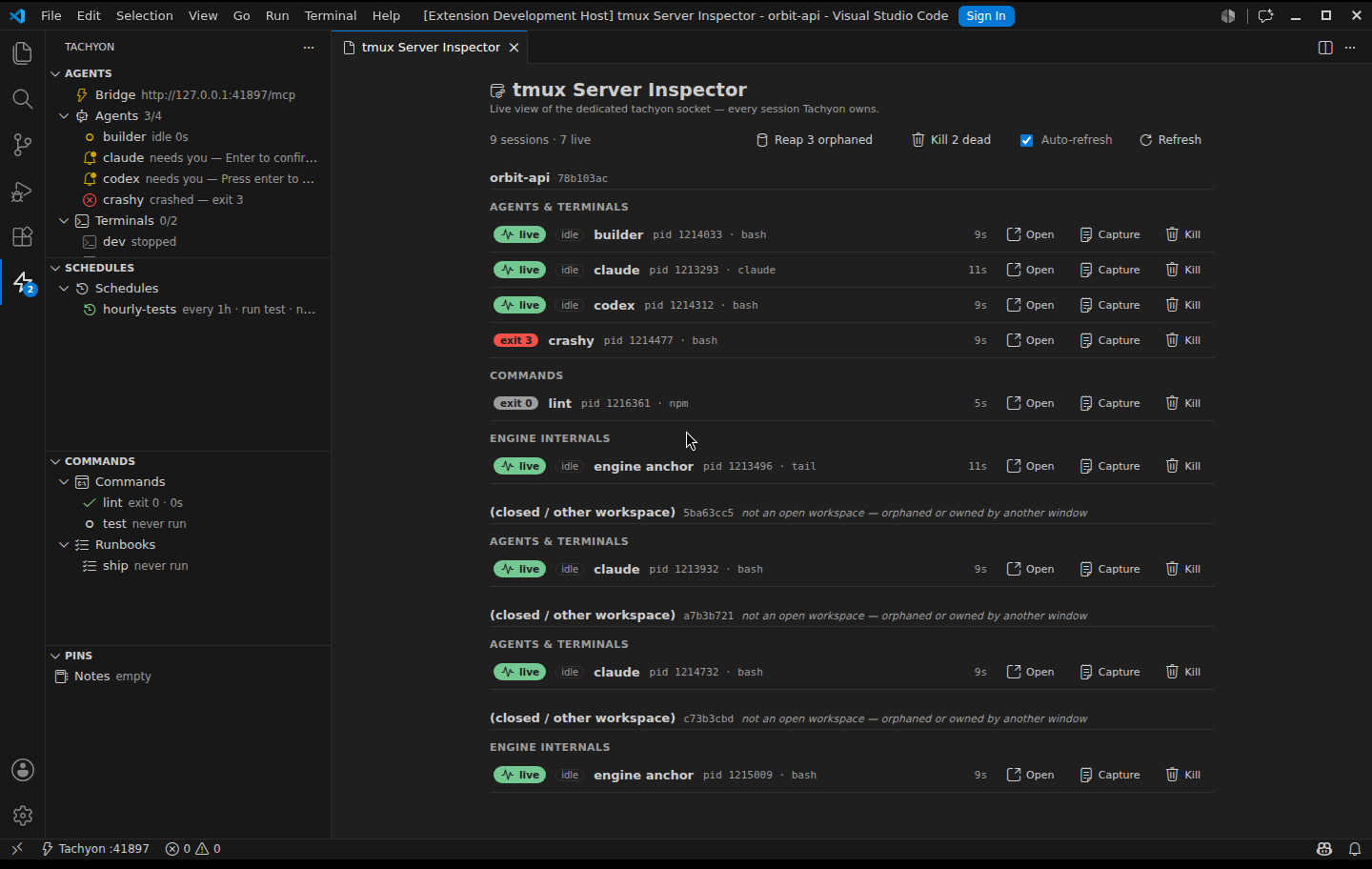
- Cross-workspace — agents, commands, runbook steps and orphaned sessions, with busy/idle and uptime
- Per session: Open (attach in a terminal), Capture, Kill — plus one-click Kill-all-dead and Reap-orphans
- Only Tachyon's dedicated socket, never your own tmux — Kill stays safe by design
Manage everything from the UI
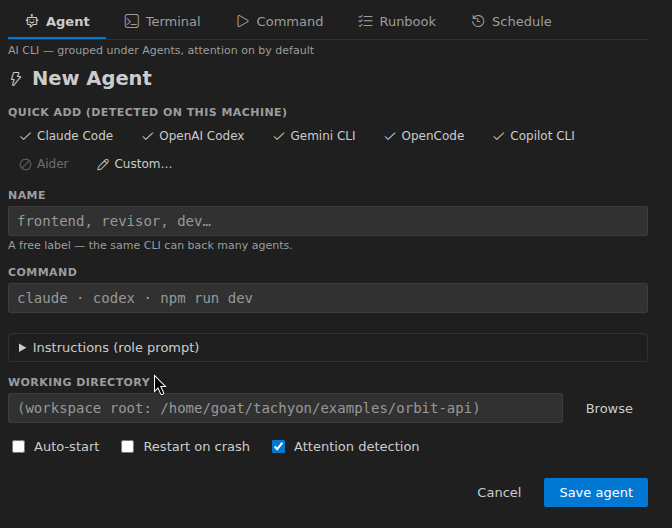
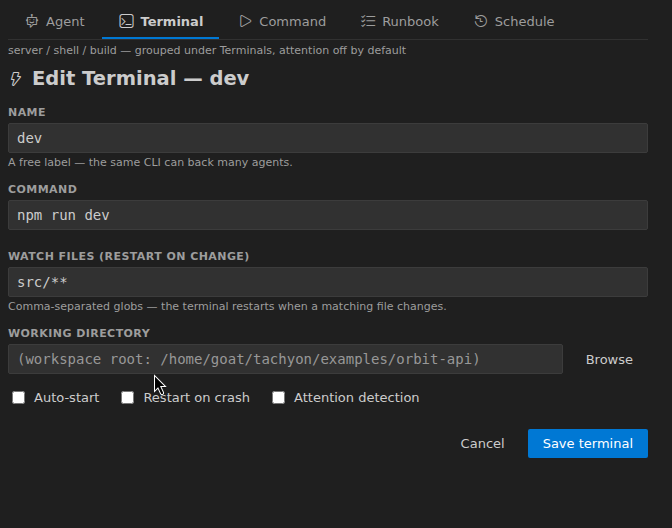
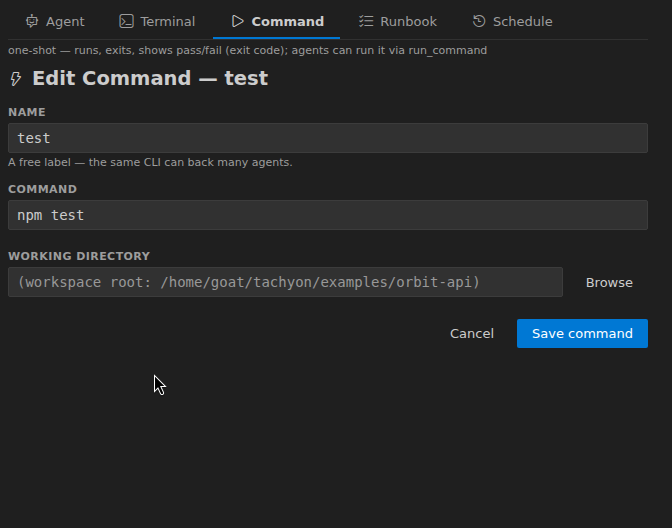
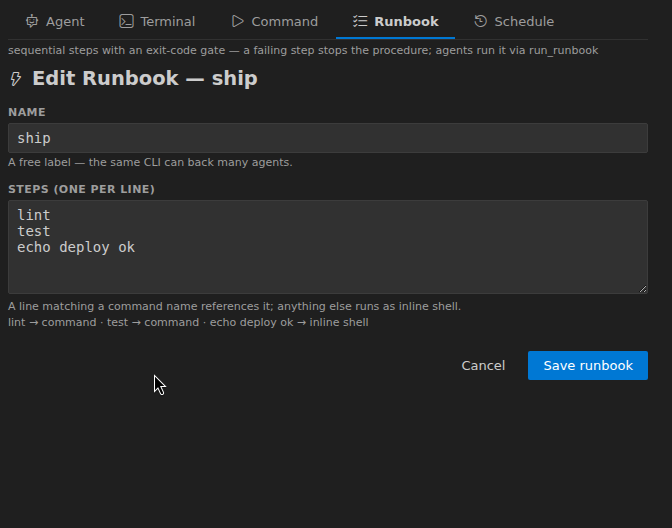
One form, five tabs — Agent, Terminal, Command, Runbook, Schedule. Quick-add chips for the AI CLIs detected on your machine, per-runtime flag chips, role instructions. Every edit goes through the same comment-preserving pipeline as hand-editing.
Local by design
- Loopback only — the Bridge binds to 127.0.0.1, never the network. No cloud, no telemetry, no account.
- Bearer auth by default — per-workspace token in the extension's private storage, referenced via env var, never written to a committable file; injected automatically into every spawned session.
- Workspace isolation — sessions, port, token and pins are namespaced per folder; Tachyon runs its own tmux server, your
~/.tmux.confis never touched. - Guardrails —
maxAgentscaps concurrent sessions (no fork-bombs); destructive UI actions confirm or refuse while running.
Start your fleet. It's free.
MIT-licensed, open source, bring your own agent CLIs.